Help Scout for Healthcare
Patient trust starts with great communication
When you're juggling everything from appointment requests to billing disputes, balancing speed with HIPAA compliance gets tricky.
Help Scout is help desk software for teams that need to respond quickly while protecting access to sensitive patient information.


Top healthcare teams use Help Scout





Respond to 56% more messages in your first year.
Customer CSAT is 25% higher than the industry average.
Resolve 73% of AI interactions automatically on average.
Built for growth: 80% of Help Scout customers stay for 4+ years.
Is Outlook or Gmail getting in the way of patient care?
Standard email tools work well for individual accounts, but aren't designed for teams or cross-functional work. They may be fine at first, but eventually the system breaks down.
You end up with:
No accountability
Front desk staff and billing coordinators don't know which requests they're responsible for. Some messages receive multiple replies, while others slip through the cracks.
No urgency
Without collaboration tools, staff are left forwarding emails back and forth or tracking down colleagues in person, slowing down response times and frustrating patients in the process.
No oversight
Email clients rarely come with reporting abilities, leaving administrators without any data on volume, response times, team performance, or patient needs.
No protection
With standard email, there are minimal safeguards built in to protect patient health information (PHI), leaving sensitive data vulnerable and putting your organization at risk.
Help Scout solves the shared email problem
Help Scout's shared inbox is designed for the way healthcare organizations actually work — so your team saves time and your patients get fast assistance.


Every conversation, all in one place
Email inboxes are crowded with messages from colleagues, vendor newsletters, and spam. The problem only grows when important requests are spread across multiple staff inboxes.
Help Scout brings all of your organization's shared email accounts (info@, billing@, providers@, etc.) into a single tool where every message is accounted for.


Organize from the start
Create teams and manage all incoming messages from one inbox, or create separate inboxes for each department or for teams handling PHI.
Patient context at a glance
Have the facts you need (like contact information and past emails) right alongside the conversation to keep your replies accurate and helpful.
Maintain consistency
Curate a library of saved replies for your most common questions so that answers stay uniform and concise.
Draft replies in seconds
Use AI to draft initial responses to incoming emails based on sources like your account's conversation history. All you have to do is review and hit send.
Track urgent requests
Build custom conversation views based on criteria like time, sender, or subject to keep urgent and specialized requests front and center.
Save time with automation
Automate busy work like labeling requests, sending auto-replies, or routing messages to the right department.
Stay in sync as a team
Coordinating patient care, provider relationships, and clinical operations requires intentional communication.
Help Scout ensures that providers and administrative teams know which requests they're responsible for and have the tools they need to keep every conversation moving forward.

Establish ownership
Assign emails to individual people or departments to create accountability and ensure that every question is handled by an expert.
Route email automatically
Cut down on inbox triage time and help keep workloads balanced by automatically routing conversations to specific people or teams.
Work without overlap
While scanning your inbox, see who is actively viewing or responding to each email. Built-in collision detection also prevents duplicate replies from being sent.
Leave notes for teammates
Tag in a colleague for help on a complex case or leave a private note with context right in the email thread before a reply goes out.
Summarize long conversations
Use AI to quickly get up to speed on patient and clinician requests so you can weigh in and reply faster.
Know the status of every case
Set conversation statuses to easily identify which requests have been answered and which still need your attention.
Make data-driven decisions
If you don't understand the issues your organization is facing or the workload your team is taking on, it’s hard to make informed decisions.
Help Scout comes with dashboards right out of the box to break down the basics. You can also create custom filters to help you zero in on what's most important.

Monitor volume and performance
Track metrics by department, team, or individual to better understand workload, current trends, and organizational efficiency.
Plan ahead
Identify peak times to help with scheduling and preparing for busy periods like open enrollment, cold and flu season, or the year-end rush as deductibles reset.
Anticipate patient needs
Whether it's a recurring billing hiccup or a change in the kind of services being requested, use reports to identify trends and make improvements.


Help Scout has allowed our team to better visualize and address problems... This leads to greater collaboration and knowledge sharing, which makes for better support.
Reduce the email workload for your whole team
Patient, provider, and vendor support doesn't have to stay in the inbox. These tools keep basic questions out of the queue and give your team time back to focus on more impactful tasks.

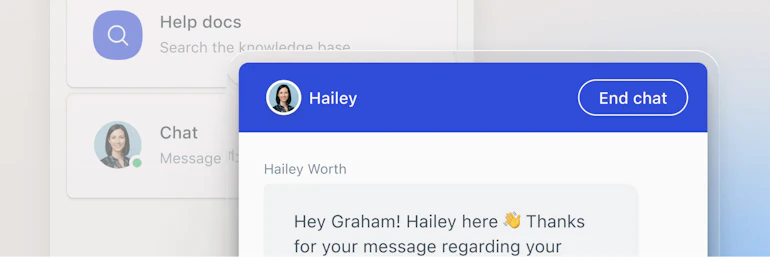
Live chat
Not every conversation is suited to email. If you’re handling issues that need real-time responses, live chat is a natural fit. You can activate live chat on any web page based on your team's availability.

Proactive messaging
Need to update patients on changes to clinic hours or encourage them to schedule an annual wellness visit? Add a pop up or banner message to your website as an easy way to amplify important announcements.

Self-service
For questions that don't require the discussion of PHI, create a knowledge base full of the information your patients need to know. When paired with an AI chatbot, people can get the answers they need while your team focuses on more complex requests.

Integrations
Connect billing software, patient intake tools, and electronic health records (EHR) systems to the platform so you can provide great support without having to switch contexts or tools.
Get up and running fast
Help Scout is powerful, yet still easy to use and implement. Get started with minimal IT involvement and if you run into any issues, we're here to help.
Built to meet your needs
You can be up and running with Help Scout in as little as five minutes. Have a more complex setup? Our APIs and documentation make it easy for your development team to configure Help Scout to fit your organization's specific needs.
Intuitive from the start
Unlike other tools, Help Scout doesn't come with a steep learning curve. Onboarding new front desk staff, patient service reps, and providers is quick and easy.
We're here to help
Have questions? Our team is available 24/6 to provide support and find solutions to any challenges that surface during implementation (and beyond).
Designed to help you keep patient data safe
Many Help Scout features can be configured to be HIPAA compliant, so you can process and store PHI securely.

Secure access
All web application communications are encrypted over 256-bit SSL, and access can be managed via two-factor authentication (2FA), SSO, or any SAML-compatible identity provider.

Permissions and data controls
Right-size your team's access and limit what administrative staff can see and do. Help Scout also supports data redaction in notifications, reducing the risk of exposing sensitive information.

HIPAA compliance
Help Scout will sign a business associate agreement (BAA) upon request and offer an additional AI addendum for healthcare companies interested in using AI features within their account.
Already using Help Scout and want to go deeper?
Explore our healthcare hubFAQ
A shared inbox is a type of software that is designed to help individual teams, departments, or even entire organizations manage email collaboratively.
Emails flow into an inbox just like they do with standard email clients like Outlook or Gmail. However, once there, teams can work together using features like conversation assignments, private notes, and collision detection to create accountability, reduce friction, and respond to messages more quickly.
Help Scout works by forwarding your existing email account (ex. scheduling@, insurance@, etc.) into our system. Once messages land in your Help Scout inbox, you can use all of our features to respond. All emails sent from Help Scout will still be sent using your existing address.
However, once you make the switch, all emails must be handled within your Help Scout inbox.
We partner with a company called Import2, which makes migrating old messages from other services like Gmail, Outlook, Zendesk, and Intercom really easy.
Read more about Import2’s service.
Yes. Access to incoming messages happens at the inbox level. Depending on your pricing plan, you may be able to have multiple inboxes (e.g. one for records@, one for referrals@, another for general information, etc.), and then you can decide which users have access to each of them separately.
We understand that every organization has unique needs around access and privacy, so our team would be happy to chat and discuss solutions that might work for you.
Feel free to reach out to our support team or schedule a demo.
Our pre-built reporting dashboards allow you to measure important metrics like conversation volume, resolution time, and customer satisfaction across all channels.
You can also create custom reporting filters that allow you to track conversations based on tags, custom fields, or views.
Learn more about reporting in Help Scout.
Help Scout is an intuitive platform that can be set up, usually in a matter of minutes, with minimal help from your IT department.
For organizations that require a more customized experience, the timeline will depend on your development resources.
Reach out to our support team or schedule a demo with sales if you’d like to walk through what the process might look like for your organization.
Help Scout has a fully-featured API that can be used to integrate with other tools in your tech stack, like an Electronic Health Records (EHR) or Electronic Medical Records (EMR) system.
These integrations are both possible and helpful, but keep in mind that while Help Scout will pass the data securely, we cannot control what happens to the data once it leaves Help Scout's system. Your organization is responsible for ensuring HIPAA compliance for data once it leaves Help Scout.
For more information about our API, view Help Scout's developer documentation.
For more information about Help Scout and third-party integrations, visit our help center.
Yes, many Help Scout features can be configured to be HIPAA compliant, ensuring the secure processing and storage of electronic protected health information.
When it comes to handling ePHI over channels like email, live chat, and in-app messaging, Help Scout is designed to support your compliance efforts in a number of ways:
Business associate agreements (BAAs): Help Scout’s business associate agreement (BAA) is posted online, and we’ll sign one upon request.
Data storage location: Help Scout is hosted on Amazon Web Services (AWS), a scalable, cloud-based computing platform with end-to-end security and built-in privacy features. AWS is HIPAA compliant, enabling covered entities subject to HIPAA to use their secure environment to process, maintain, and store protected health information.
Uptime and data availability: We strive for 99.99% uptime across all of our products.
User authentication: Help Scout supports two-factor authentication (2FA) access for Help Scout credentials or SSO through Google Apps. Certain plans have options for enabling authentication via any SAML-compatible identity provider.
Data security: Help Scout's internal application communications (including notes, API calls, and live chat conversations) are encrypted over 256-bit SSL (secure sockets layer).
Audits: Help Scout completes regular audits and annual risk assessments to ensure continued HIPAA compliance. This includes updating, reviewing, and testing our disaster recovery plan.
Keep in mind that while the majority of Help Scout’s features can be configured to be HIPAA compliant, integrations between Help Scout and other platforms may not meet HIPAA standards. In addition, Help Scout’s knowledge base solution, Docs, isn’t considered to be compliant and should only be used for data that is not sensitive in nature.
For more information on HIPAA compliance and security at Help Scout, visit:
No, Help Scout doesn’t offer a patient portal.
However, you can use Help Scout's fully featured API to build a portal on top of our software if a more secure solution for certain patient communications is required.
For more information about our API, view Help Scout's developer documentation.
For more information about Help Scout and third-party integrations, visit our help center.
Yes. If you have signed a BAA with us and would like to enable AI features, please reach out to add an AI Feature Healthcare Addendum to your agreement.
If you don’t have a signed BAA with us yet, you can sign the AI addendum at the same time. Links to our BAA documents can be found in our help center.
For more information about AI and Help Scout, visit our AI Transparency Hub.
Yes. AI features are automatically turned off in all HIPAA accounts and are only accessible to accounts that have signed a BAA with an AI addendum.





